Are you looking for the best WordPress themes for graphic designers? For a graphic design website, you may be looking for something creative and inspiring. Typical blog or business templates often do not meet the criteria. In this guide, we have hand-picked the best WordPress themes for graphic designers that are both functional and creative.

Creating a Graphic Design Website with WordPress
WordPress is the best website builder for artists, designers, and creative folks. It offers great flexibility and freedoms to match your artistic expression.
There are two different types of WordPress. A self hosted WordPress.org website gives you access to all features of WordPress. See our comparison of WordPress.com vs WordPress.org for more details.
You will need a WordPress hosting account and a domain name to use self hosted WordPress.
We recommend using Bluehost. They are an officially recommended WordPress hosting provider and one of the largest web hosting companies in the world.
Once you have purchased hosting. Head over to our guide on how to make a website for step by step installation instructions.
Having said that, let’s take a look at the best WordPress themes for graphic designers that you can use on your website.

Creativo is an all-purpose WordPress theme with 11 ready-made websites that can be installed with 1-click. These demo websites include one for creative professionals and another one for agencies. Each one of these templates can be completely customized using a premium drag and drop builder plugin that ships free with the theme.
It includes an easy to use custom theme options dashboard which helps you easily set up your website. It includes tons of templates, a blog section, custom widgets, and unlimited colors.
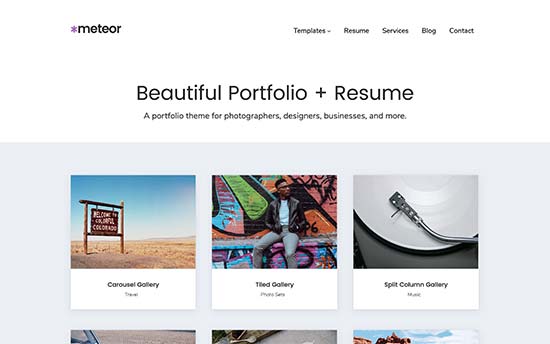
Designed to build portfolio and resume websites, Meteor is the perfect theme for graphic designers. Its main feature would be the masonry grid layout for your portfolio items at the front.
Each portfolio item has its own details page where you can add more videos, image galleries, description, and more. It also comes with a resume template to showcase your qualifications and experience to prospective clients.

Soho is a WordPress art gallery theme which can easily repurposed for graphic design galleries and exhibitions. It includes sections to display upcoming events, artists, a blog section, exhibitions, and contact form.
It includes features like custom columns, buttons, tables, panels, icon fonts, and more. It is easy to set up and includes a simple theme options panel and full live customizer support.

Lense is a beautiful WordPress theme suitable for graphic designers, artists, and photographers. It includes 6 beautiful photo gallery layouts including horizontal scrolling, sliders, and multi-column masonry grids.
Despite its minimalist design, Lense gives you full control to use any colors, add widgets, and create custom layouts with page builder of your choice. It is super easy to use and customize and has a powerful theme options panel.

Kanop is another gorgeous WordPress theme for graphic designers, artists, and creative professionals. Its homepage features a masonry grid layout with a welcome message at the top.
It is super easy to use and includes 1-click demo installer, custom theme settings page, and drag and drop page builder. It ships with a premium WordPress slider plugin and full support for multilingual websites using WPML.

Pepper+ is a beautifully crafted WordPress theme for designers and artists. It takes a modular approach to design and allows you to create any kind of website using simple drag and drop modules.
It ships with 4 ready-made websites that can be installed with 1-click. These websites include one designed specifically for individual artists. Other notable features include beautiful typography, icon fonts, contact form and more.

Kansas is a minimalist WordPress theme for graphic designers, photographers, and artists. It comes with a spacious layout with lots of white space and crisp typography.
It is easy to setup with demo installer and a custom theme settings panel. It includes a filterable portfolio, image galleries, unlimited colors, and custom widgets.

Agency Pro is a powerful WordPress theme for graphic design agencies. It features gorgeous full screen background image with your featured work and recent posts on the homepage.
It is designed for Genesis theme framework, which is built for speed and performance. Other features include custom page templates, widgetized homepage, customizable header, and more.

Martho is a powerful yet minimalist WordPress theme for artists, designers, and photographers. It comes with beautiful portfolio templates to easily showcase your best work.
It ships with page builder and slider plugins. Other features include photo galleries, featured content carousels, social media sharing, WooCommerce support, and more.

Vogue is a modern WordPress theme designed for fashion, designers, artists, and photographers. Its refreshing design uses lots of white space which breathes new life into your images.
It includes a beautiful slider on the homepage, followed by your content. Inside you’ll also find custom widgets for social media profiles, Instagram widget, popular posts, and contact form popup.

Verb is designed specifically for graphic designers, illustrators, and photographers. This beautiful WordPress theme comes with a powerful portfolio section. Each portfolio item has a detailed page where you can add more details.
Other notable features include crisp typography, lightbox popup for galleries, color picker, full width page template, and more. It is easy to use and comes with a getting started dashboard to help you set up your website.

Hellomouse is a creative WordPress theme for graphic designers, artists, and illustrators. Designed for great first impression it puts your latest work at the front and center of your website. This will help you generate more leads and get more work.
It is quicker to setup and easier to customize with more than 60 options in customizer. Other notable features include custom widgets for social media and content discovery, full width page templates, and page builder support.

If you are looking for an ultra minimalist option, then you’ll love Monochrome. This Genesis child theme uses lots of white space and beautifully displays your images.
It includes a simpler theme options panel and live customizer support. The homepage layout is fully widgetized and you can just drag and drop widgets to set it up. It is also ecommerce ready and can be easily used to add an online store to your site.

Candid is a WordPress theme for story-tellers, designers, and artists. It allows you to combine your artwork with text to create compelling content that looks great and inspires you to create more.
It includes social icons menu, contact page, lightbox galleries, and background color picker. It is designed to work out of the box and includes only the options you’ll need. It even includes a getting started section which will help you go live in minutes.

True North is a stylish WordPress theme suitable for graphic designers, illustrators, and photographers. It comes with a built-in portfolio section where you can easily upload your work samples with descriptions and case studies.
Its homepage features a grid layout to display your work at the front and center of your website. It includes custom backgrounds and headers, custom widgets for social media profiles and content discovery features, and a powerful theme options page.

Designer is WordPress theme to quickly showcase your artwork, web design, photography, and more. It is super easy to use and includes minimal theme options which makes it quick to setup.
It includes a powerful portfolio post type with gorgeous templates to display each portfolio item with as much detail as you like. Other features include photo galleries, lightbox carousel, video popups, social media icons, and more.

Resume is a WordPress theme to build personal portfolio or resume website. It features a modern homepage layout allowing you to beautifully showcase your skills, experience, and portfolio on the front.
It includes a beautiful about me section which allows you to add bio, show awards and recognition, and more. It includes custom widgets for social media, filterable portfolio, featured content slider, and powerful theme settings page.

Corner is another great minimalist WordPress theme for designers and creative folks. It features a two column layout with navigation menu and sidebar on the left.
It includes a featured work slider, custom widgets, social media icons, unlimited colors, and ecommerce support. It comes with a powerful theme options panel and support for all popular page builders plugins.

Hamilton is a free minimalist WordPress theme for creative types. This elegant portfolio theme allows you to display posts in a beautiful grid layout using your featured images as thumbnails.
The homepage grid can be set up using two or three column layout. It comes in two color schemes light and dark. You can also use custom background colors.

Nico is a WordPress theme for artists and designers. Its homepage comes in a two column layout with sidebar on the left and a grid of your latest work on the right. The latest work grid can be configured to use three, or even four columns.
It includes a filterable portfolio post type to easily showcase your best work. It comes in different color schemes and you can also create your own. All theme options are quite easy to use and setup.

Couture is a free WordPress theme suitable for fashion, photography, and design blogs. It features an elegant and simple layout with your custom logo on the top, navigation menus, followed by your recent posts grid.
It is really simple to use and works out of the box. You will find familiar customization options under live theme customizer.

As the name suggests Creatica is a WordPress theme for creatives, agencies, and artists. It comes with 14 ready-made demos including templates for agencies, freelancers, resume, and portfolios. You can install these demos with a single click and then use the page builder plugin to customize them.
It comes with powerful theme options panel which helps you set up your website. It includes tons of customization options including social media integration, multiple header styles, custom widgets, unlimited colors and layout choices.

Peak is a modern and stylish WordPress theme for photographers and creatives. Boasting a masonry tiles layout, Peak can automatically populate tiles from your posts with each tile size generated dynamically. You can also generate your own tile sizes if you want.
Peak comes with a built-in portfolio post type, mega menus, slide out widgets, page title banner, custom 404 error page, and full WooCommerce support.

Heron is clean cut WordPress theme designed for photography, design, art, and personal blogs. Its main feature would be its clean layout, beautiful typography, and easier setup.
Heron comes with only the features you will need. All theme options are under live customizer and you can change background color, add social media icons, and access theme options at the same location.

North is a WordPress theme made specifically for graphic designers, artists, and photographers. It features a simple design with your latest work displayed on the front page in a distraction free layout.
North includes a portfolio section and each portfolio item comes with its own unique template. It does not ship with complicated settings and can be set up with in minutes.

If you are a graphic designer or illustrator looking for a colorful bold option for your website, then take a look at Freelo. This beautifully designed WordPress theme is made specifically to help artists showcase their work and make it pop out.
It includes multiple portfolios, blog layouts, page templates, custom widgets, and more. It ships with full support for WooCommerce and WPML for multilingual websites.
We hope this article helped you find the best WordPress themes for graphic designers. You may also want to see our ultimate step by step WordPress SEO guide for beginners.
If you liked this article, then please subscribe to our YouTube Channel for WordPress video tutorials. You can also find us on Twitter and Facebook.
The post 26 Best WordPress Themes for Graphic Designers appeared first on WPBeginner.