Looking for the best WordPress RSS feed plugins? These plugins can help you do something simple – like display RSS feed items via a shortcode. But some also get more advanced and can help you do neat stuff like import RSS feed items as actual WordPress posts, filter RSS feeds by keywords, and lots more. ... Read more5 Best WordPress RSS Feed Plugins To Import RSS Content
Recently, one of our readers asked us if it’s ok to use nulled WordPress themes and plugins? Nulled themes and plugins are pirated copies of premium WordPress products. In this article, we will explain why you must avoid nulled WordPress themes and plugins, specially if you’re serious about your website.
What are Nulled WordPress Themes & Plugins?
Nulled WordPress themes and plugins are pirated copies of paid WordPress themes and plugins distributed unethically on the internet.
The folks redistributing nulled items argue that because WordPress and any derivative works (like plugins and themes) are licensed under GPL, it’s completely ok to copy and distribute it.
While that’s true, often this comes with big cost. Not only does it cause good WordPress companies to lose money, but most importantly it compromises the security and integrity of websites using these nulled WordPress themes and plugins.
Yes often these nulled themes and plugins are the reason why your websites get hacked.
Here are some of the top reasons why you must avoid using nulled WordPress plugins and themes on your website.
1. Security
Nulled WordPress plugins and themes are extremely dangerous for WordPress security. They are known to carry malware.
The malicious code can spread across different files to disguise itself which makes it hard to detect and fix when your website is hacked.
You could also lose your site data in the hack process. Last but not least, your site may get de-indexed from search engines for distributing malware.
2. Privacy
Nulled WordPress themes and plugins can have different kind of malicious code hidden inside. This can include code that steals information from your WordPress site and makes it available to hackers on the dark web.
This information may include your username, email address, and passwords. If you run an online store or membership website, then the personal information of your customers can also be at risk.
These kind of hacks are hard to detect and may go unnoticed as your WordPress site keeps functioning normally.
3. Bad for SEO
Pirated WordPress themes and plugins can destroy your WordPress SEO completely. Nulled WordPress themes and plugins can add spam links to your website or hijack your users and redirect them to bad websites.
These activities are hard to detect by human eyes as the links are well hidden in the code. You will likely not be redirected when you are logged in to your WordPress account. However, search engines will be quick to notice that and penalize your website by dropping your search rankings or de-indexing your website completely.
You will have to spend months to recover your website’s SEO rankings and sometimes you may even have to make a new website from scratch.
4. Legal Issues
Many WordPress themes and plugins are open source, but some of them are sold with mixed licenses. This means that some parts of the code are protected by copyright laws and if you are using a nulled WordPress theme or plugin, then you don’t have legal permission to do so.
Pirated WordPress themes can result in data theft, data loss, or distribution of illegal material. All of these can lead to legal proceedings where you may end up paying huge sums to lawyers.
5. No Access to Updates
Most WordPress themes and plugins regularly release updates to fix bugs, add new features, and close security issues. Nulled WordPress themes and plugins cannot receive those updates because they don’t have a valid license key.
This leaves your WordPress site with an outdated version which may be buggy and insecure. WordPress itself regularly releases new versions and sometimes themes and plugins need to be updated to remain compatible with the latest changes. Since nulled theme or plugin can’t be updated, your website may start misbehaving or become inaccessible.
Even the most experienced WordPress users need support and documentation to properly use premium WordPress themes and plugins.
Developers of these products spend a lot of their time on providing support and creating documentation for their users. They even hire support specialists to answer questions and regularly add new tutorials.
If you are using a nulled WordPress theme or plugin, then you are on your own. You cannot ask the developers to help you out when you need help. You also don’t get access to documentation and tutorials because those are only available to paid customers.
7. Access to New Features
As we mentioned earlier, WordPress themes and plugins are updated regularly and often these updates include new features. If you are using a pirated WordPress product, then you cannot get automatic updates, and you wouldn’t even know that there are new features available.
These new features can significantly improve your website and help you make more money online. However, you will be totally unaware of these changes and will be stuck with an outdated version.
8. Unethical use Discourages Innovation
Now some may argue that it is a tiny piece of software, and I am doing this because I cannot afford to pay for it at the moment. However, this tiny piece of code is the result of someone’s skill, talent, and hard work. By using a nulled software, you are taking away money from those developers.
Developers not only spend their time on writing code, they also have to provide support, create documentation, make a website, hire support staff, and spend a lot of money to run their business. Using nulled software hurts their business, and they end up losing money.
These unethical practices may discourage developers from creating new innovative products that can benefit millions of users.
9. The Abundance of Free Alternatives
There is no reason for anyone to use nulled WordPress themes and plugins. No matter which WordPress theme or plugin you choose, there is always more than one suitable free alternative available for them.
In fact, many premium WordPress plugins have limited free versions to help you get started. Need a contact form? Get started with the free version of WPForms Lite. Need Google Analytics? Try the free version of MonsterInsights.
For WordPress themes, take a look at our expert-pick of the best free WordPress themes that are just as good as a premium theme.
WordPress.org has thousands of free plugins and themes. Some of them are even better than many premium products. Most importantly, you can use them legally with no burden on your conscience and without affecting WordPress community negatively.
We hope this article helped you learn why you must avoid nulled WordPress plugins and themes. You may also want to see our article on the cost of building a WordPress website with tips on how to save money.
If you liked this article, then please subscribe to our YouTube Channel for WordPress video tutorials. You can also find us on Twitter and Facebook.
Do you know how well your WooCommerce store is actually doing? If you’re using the default WooCommerce reports, that’s not always the easiest thing to know. Don’t get me wrong – they’re functional enough for basic uses. But there are much more detailed (not to mention more usable) options out there. We’ve collected some of [...]
Do you know how well your WooCommerce store is actually doing? If you’re using the default WooCommerce reports, that’s not always the easiest thing to know. Don’t get me wrong – they’re functional enough for basic uses. But there are much more detailed (not to mention more usable) options out there. And I’ve collected some ... Read more6 Best WooCommerce Reports And Analytics Plugins For Your Store
When starting a blog, one of the most common questions you might think of is which are the most popular types of blog? There are many different types of blogs covering a wide range of topics, interests, and audiences. For a successful blog, you need to plan ahead and choose the niche that works for you. In this article, we will share the most popular types of blogs that you can start right away.
What Should You Blog About?
To decide the niche of your blog, you need to know about your passion. Every niche has its own audience who search for content related to their interests. Writing about your passion helps you continuously come up with great content ideas as your blog grows.
You don’t just need to plan for content. You also need to choose a WordPress theme, optimize for SEO, and improve performance of your site. These are the tasks that are not directly related to writing but equally important for the success of your blog.
Let’s take a look at the most popular types of blogs that exist:
1. Fashion Blogs
Fashion blogs are one of the most popular types of blogs on the internet. It’s a big industry with a huge global audience. Fashion bloggers get invited to major events, receive special perks, merchandise, and even business deals by top fashion brands.
These types of blogs are good for creative people with a keen eye for style and fashion. You can start a fashion blog and start making money online by following our guide.
2. Food Blogs
Food blogs are another popular blog type. It attracts a lot of readers who are interested in recipes, ingredients, healthy eating, fine dining, and other food related stories.
Many food bloggers just start with something as simple as their local restaurant reviews. However, as their blog grows so does their interests and target audience. They start covering other food related topics as well. Take a look at our guide on how to start a food blog.
3. Travel Blogs
Travel blogs are becoming more popular each day. Due to cheap air travel, people are traveling more than ever, and they are always looking for travel tips, advice, and destination guides.
These blogs make it easy for other travelers to learn about a destination they have never been to. If you are a traveler, then we recommend you to create your travel blog.
4. Music Blogs
Music blogs has a wide audience who search for critiques on the best and trending music. Music lovers enjoy songs from different languages, cultures and norms.
The music industry has big potential for bloggers to write about different types of music like jazz, pop, heavy metal, famous singers, and more.
5. Lifestyle Blogs
Lifestyle blogs are the most popular type of blogs you can find online. They have a variety of readers, interested in topics ranging from culture, arts, local news, and politics. This gives the blogger a wide range of topics to cover, making it easier to plan their content strategy.
Lifestyle bloggers get opportunities to be an influencer, write for other publications, become a speaker, and partner with businesses who are working to make a difference in the society.
6. Fitness Blogs
Fitness blogs has been a hot trend since they cover important topics like health and general fitness. People all over the world rely on the internet to seek advice on how to stay fit. It’s a great opportunity for fitness instructors to start a fitness blog and get clients online.
These types of bloggers/instructors write about diets, diet plans, workouts, supplements, and more. Fitness bloggers can also create video content to explain different exercises to their audience. They can monetize their website and videos using Google AdSense and affiliate marketing.
7. DIY Blogs
DIY blogs are very interesting and have a huge audience. It has multiple sub-types like arts and crafts, construction, wood-work, metal-work and more.
These interesting DIY activities would encourage visitors to try new stuff and share it with the trainer/blogger. DIY blogs may involve a lot of communication which is great for blogging.
8. Sports Blogs
Sports blogs are another interesting type of blogs online. Every country in the world has different sports and every sport has its own stars. Sports blogging may also include bloggers who are writing paid content for teams, athletes, and other organizations.
The other format in sports blogging is to write about latest events all over the world. Furthermore, bloggers share live status of multiple sports on their Twitter accounts automatically linked to the blogs.
9. Finance Blogs
A lot of us need help and advice to manage our finances efficiently. This gives finance blogs a wide audience ranging from serious investors to families trying to save for a better future.
Personal finance blogs share advice for businesses, investors, startups, individuals and families. It’s a good blog niche for the people interested in the complex world of managing money and generating wealth.
10. Political Blogs
Political blogs have perhaps the most passionate audience of all. They cover news on politics, analysis of political news, and can quickly build a very large engaging audience.
It has become common for the big political affiliates to hire their own blogging team. These bloggers share the agenda of the political party and write about their policies / plans to attract more people towards the representatives.
11. Parenting Blogs
Parenting blogs have a huge, passionate, and highly engaged audience. New parents worry a lot and are always willing to improve their parenting skills.
Mom blogs and dad blogs have different styles of writing. These blogs may involve activities with kids, guidance on food, techniques for early home education and more.
12. Business Blogs
Business blogs are the professional blogs related to the corporate agencies, industries and others. They offer a casual way to communicate with customers and educate them about a businesses product or service.
Personal blogs belong to individual writers who share their experiences, adventures, and daily life with their audience. The purpose of personal blogging can be anything like making a difference through positive stories or influencing readers with own views.
Personal bloggers also include photographers who share photos online to get more work, vloggers who create videos on their daily life routine, chef/cook who share recipes on the blog, and more.
14. Movie Blogs
Movie blogs share news and reviews of new movies and the film industry in general. They have a large audience on the internet. Bloggers are invited to watch premium shows before the public release of movies, so they can write reviews and generate buzz about an upcoming movie.
15. Car Blogs
Car blogs are usually about luxury and sports cars. They cover a wide range of topics including latest car models, their features, engineering, and more. They can even partner up with local car dealerships for business opportunities. These blogs have all the information about modern cars, vintage cars, safety tips for drivers, and more.
Many people get attracted to good cars and spend a lot of time in reading about features of their favorite cars online. It’s a great niche to adopt as a blog type for car lovers.
Some bloggers also write about car financing tips, financing calculators, corporate and banks offers, and finance schedules. It helps the reader find cars in their budget without visiting showrooms.
16. News Blogs
News blogs cover local news and are a great way for journalism students to build up their resume and sharpen their skills. They can cover a wide range of topics or limit to a particular news section. News blogs are not just about sharing news. They also include opinion pieces to share blogger’s own perspective of the news.
The news blogs are updated more frequently to cover latest happenings. News can be about anything like climate change, scientific innovations, technology, politics, religion, and more. Big media outlets have several bloggers to work on each of these sub-types in news blogging.
17. Pet Blogs
Pet blogs have a great readership online that includes pet owners, animal lovers, animal shelters, and people looking for pets. Pet bloggers share tips on keeping pets healthy, pet grooming, pet food, and training.
Animal foster homes also write about their efforts to protect and save animals. Pet bloggers can partner up with businesses selling pet care products to generate revenue.
18. Gaming Blogs
Gaming blogs cater to a large community of gamers looking for articles about latest games, gaming hardware, events, game cheats, and more. This community has grown significantly in the recent years.
Most gaming blogs belong to gamers, reviewers, and official communities of big game developing agencies. They have international events for gamers and reward plans for the winners. It’s a popular blog type and growing everyday.
Once you have chosen your blog’s niche, the next step is to find blog post ideas that you can use on your blog. You can check out this massive list of blog post ideas that you can use right away.
If you run any type of WordPress site that accepts users, you probably know that WordPress’ default user profile system isn’t really meant for the public. That is, you can’t have regular users traipsing around the WordPress dashboard to manage their profile (at least not if you care about user experience). Instead, you need something ... Read moreProfileGrid Review: Frontend WordPress User Profiles + Lots More
WordPress’ popularity brings a number of benefits that you wouldn’t get with a less popular content management system. For example, I’ve watched as it went from something you had to manually install, to something that pretty much every host offers an autoinstaller for. For those who use Plesk as their web hosting control panel (as ... Read morePlesk WordPress Toolkit: Easily Manage Staging, Updates, And Lots More
Are you looking to use FOMO and social proof notifications on your WordPress site?
FOMO, short for fear of missing out, is basically a marketing technique used to create anticipation and excitement for a product. It uses a basic psychology principle to help customers make a buying decision faster.
In this article, we will show you how to properly use FOMO on your WordPress website to increase conversions and sales.
What is FOMO and How Does it help with Conversions?
FOMO or ‘fear of missing out’ is a psychological term that describes anxiety about missing out on something exciting and trendy.
As a WordPress website owner, you can take advantage of this human behavior in your marketing strategy and improve your conversions.
The concept of FOMO is not new. It’s actually been used by marketers even before the arrival of the internet. However, with online marketing, FOMO has become far easier to implement and much more effective.
For example, if you run an online store, then you can create anticipation about an upcoming sale and limited-time offers by adding social proof to your landing pages.
With that said, let’s take a look at how to easily add FOMO to your WordPress site. We will show you two techniques that we have successfully used on our own websites with incredible results.
Method 1: Adding FOMO with Social Proof by Using TrustPulse
People feel more comfortable with their buying decision when they know others have also bought the same product or service and had a good experience with it.
This is why smart business owners use social proof in their marketing.
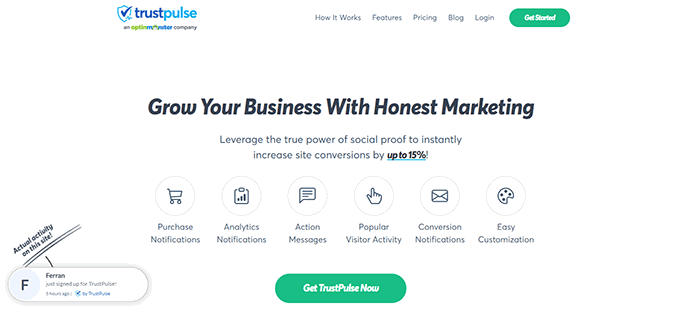
TrustPulse allows you to display real-time user activity notifications on your website, such as products purchased, forms submitted, etc.
To get started, you’ll need to install and activate the TrustPulse plugin on your website. For more details, see our step-by-step guide on how to install a WordPress plugin.
The plugin helps you connect your WordPress site to the TrustPulse app.
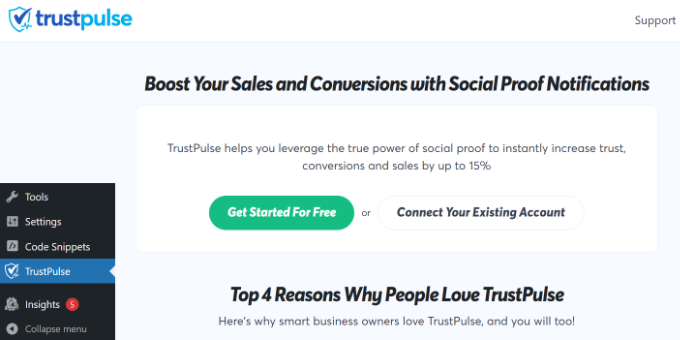
Upon activation, click on the TrustPulse menu from the WordPress admin sidebar and click the ‘Get started for free’ button to continue.
This will take you to the TrustPulse website, where you can sign up for a free account. The free plan is good for up to 500 sessions per month.
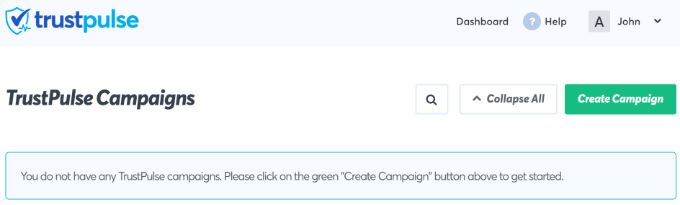
Once you sign up, you are ready to create your first campaign. Simply click on the ‘Create Campaign’ button to start your first FOMO campaign.
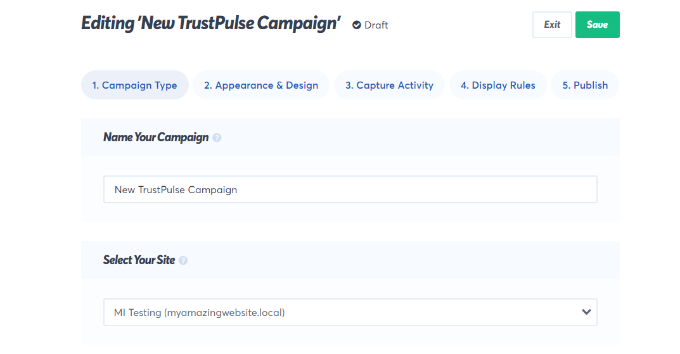
Next, you will need to provide a title for your campaign and select your website.
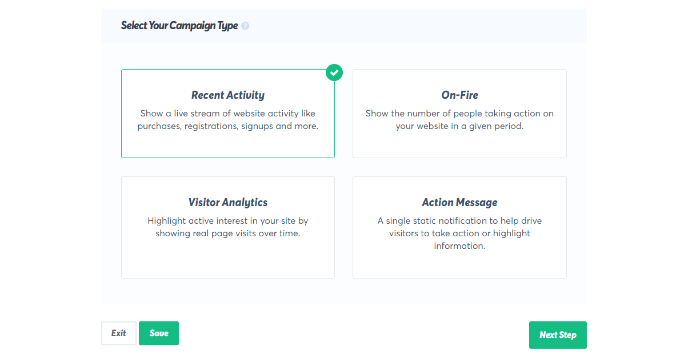
If you scroll down, then you can choose a campaign type.
TrustPulse offers 4 different campaign types to choose from.
These include showing recent activities, the number of people taking action, visitor analytics, or a static notification with helpful information.
After selecting a campaign type, don’t forget to click the ‘Next Step’ button.
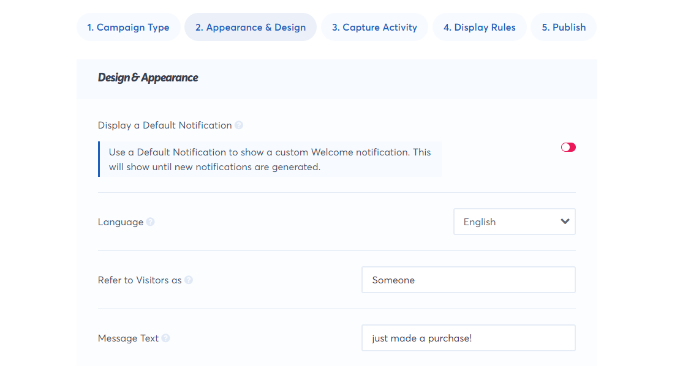
You can now head to the ‘Appearance & Design’ tab and choose language and appearance options for your campaign. You can change the position, badge image, style, and more.
Once done, click on the next step to continue.
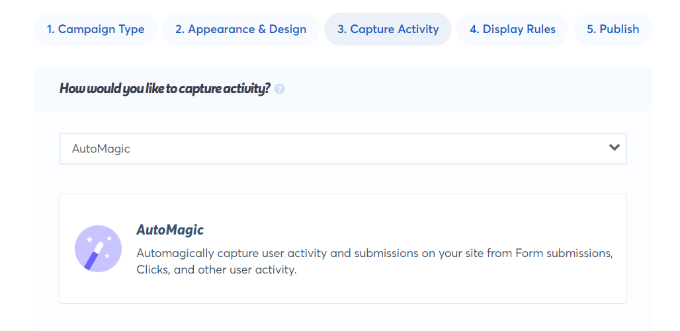
Next, you need to choose how you want to capture the activity.
We recommend using ‘AutoMagic,’ which allows you to select the activity that matches different conditions. For example, you can select your checkout page to automatically capture eCommerce activity.
You can also use Zapier to capture activities from 1000+ integrations.
Once done, click on the next step button to continue.
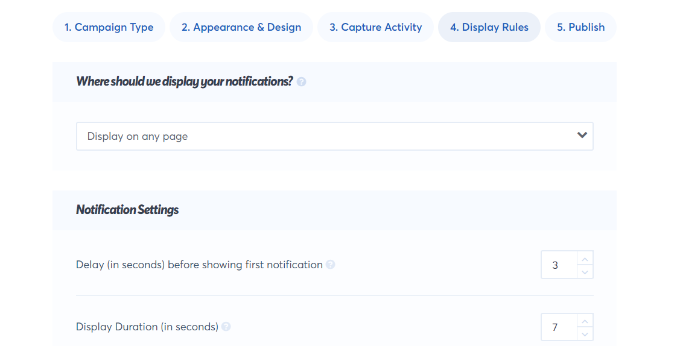
Next, you need to set up the display rules. You can display the badge on all pages or specific pages on your site. You can also choose the delay between notifications, run them as a loop, and enable mobile notifications.
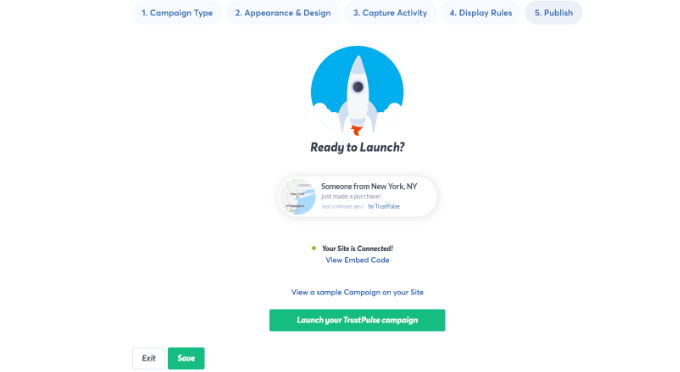
After that, click on the ‘Publish’ tab at the top.
In the next step, simply click the ‘Launch your TrustPulse campaigns’ button.
Don’t forget to click the ‘Save’ button to store your changes and then exit the campaign builder.
You can now visit your website to see your FOMO campaign in action.
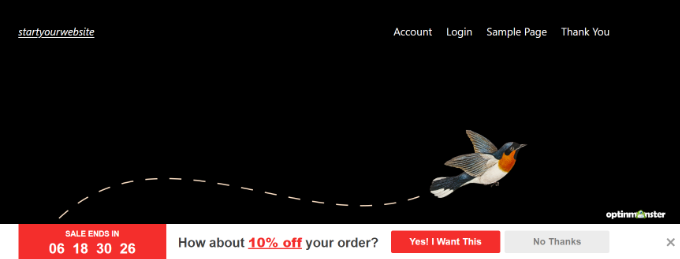
Method 2: Adding FOMO Countdown Timers with OptinMonster
We have all seen marketers using ‘Urgency’ to get customers’ attention. Whether it is your local grocery store or a big name-brand website, it is one of the oldest marketing techniques, which works just as effectively online.
Basically, you show users an offer with a sense of urgency, which triggers the fear of missing out on a valuable deal and helps users make a purchasing decision.
Urgency hacks can be used with limited-time offers, seasonal sale campaigns, one-time discounts, and more. To learn more, see this article on using urgency to hack conversion rates with proven methods.
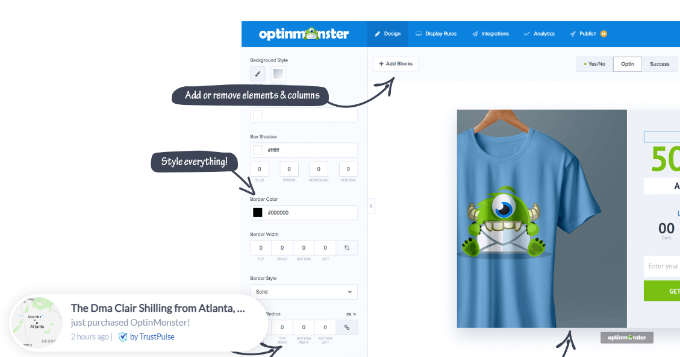
The best way to add urgency timers in WordPress or WooCommerce is by using OptinMonster. It is the most popular conversion optimization and lead generation software that helps businesses turn potentially abandoning website visitors into subscribers and customers.
First, you will need to sign up for an OptinMonster account. It is a paid tool, and you will need at least the ‘Basic’ plan to use their Floating bar campaigns.
This plugin is a connector between your WordPress site and the OptinMonster application.
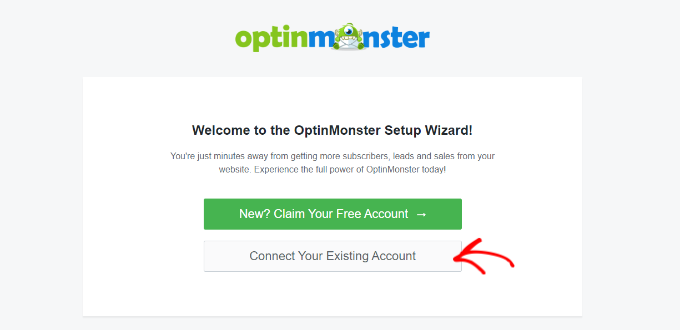
Upon activation, click on the ‘Connect Your Existing Account’ button on the OptinMonster welcome screen.
Next, you should see a new window open where you’ll be asked to connect your website.
Go ahead and click the ‘Connect to WordPress’ button.
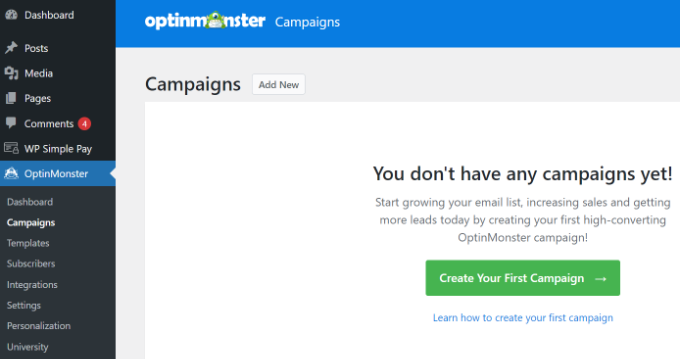
After connecting your website, you will need to go to OptinMonster » Campaigns from your WordPress dashboard.
From here, click on the ‘Create Your First Campaign’ button to continue.
This will launch the OptinMonster campaign builder.
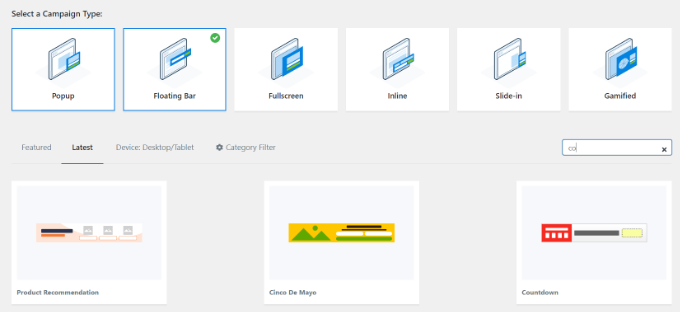
First, you will need to select an optin type and then select a theme. We will use a ‘Floating bar’ campaign with the ‘Countdown’ theme.
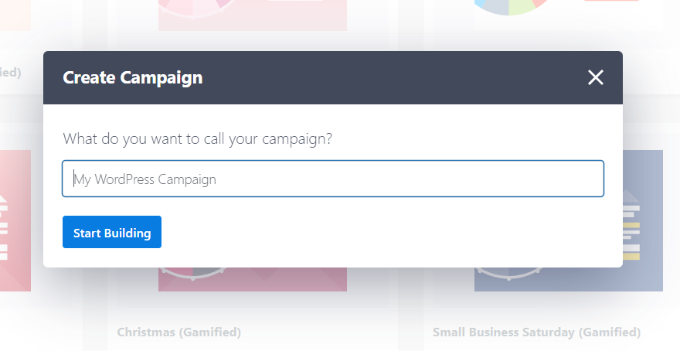
Next, you will be asked to choose a name for your campaign.
Once that’s done, simply click the ‘Start Building’ button.
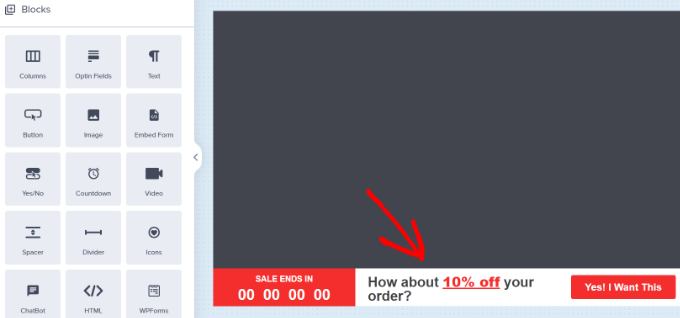
On the next screen, you’ll see the drag-and-drop tool, where you can simply point and click to design your campaign.
You’ll see a live preview of your campaign in the right panel and a bunch of customization blocks and options in the left panel.
With the floating bar countdown campaign, the preview will appear near the bottom of the screen for you, just as it does for the users.
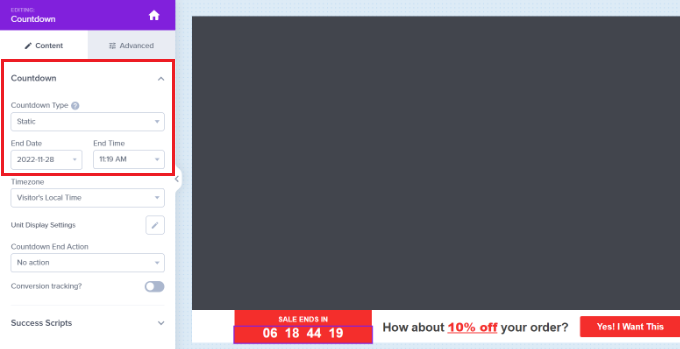
Go ahead and click on the countdown timer in the live preview to set the countdown style and end date. You can use two types of countdown timers: Static and Dynamic.
The static timer remains the same for all your users, while the Dynamic timer changes based on user behavior on your website.
For this tutorial, we will be using the static timer. Since we are using a floating bar with a countdown theme, we can move the floating bar to the bottom or the top.
You can just point and click to edit the text in your floating bar. You can add a coupon code, add links to special offers, and style it any way you want.
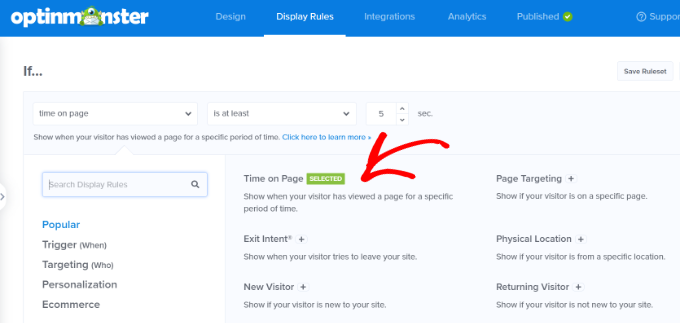
Next, you can go to the ‘Display Rule’ tab at the top. Here, you’ll see different options for showing your campaign.
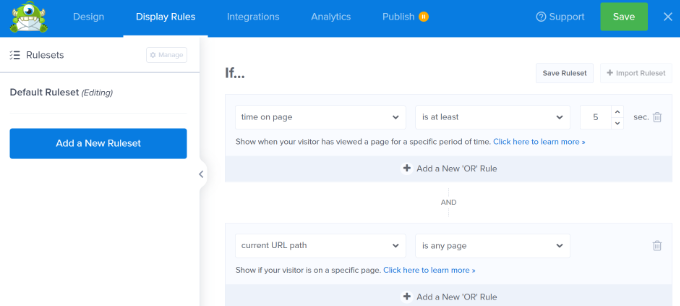
For instance, you can select the ‘Time on Page’ option and show the floating bar after a user spends at least 5 seconds on your website.
Below that, you also get to select the location for your campaign. We’ll use the default setting where the countdown timer floating bar will appear on all the pages on your website.
Once you are satisfied, don’t forget to click on the ‘Save’ button at the top.
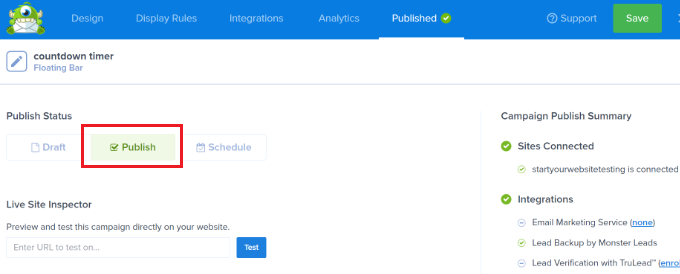
After that, head to the ‘Publish’ tab. Now, change the Publish Status from Draft to Publish.
Don’t forget to click the ‘Save’ button and close the campaign builder.
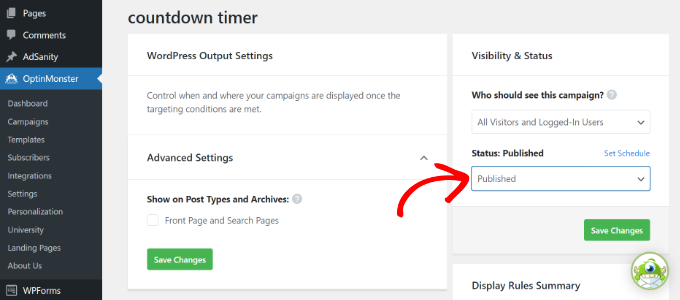
You will now see the WordPress Output settings for your recently created campaign.
By default, your campaign will be disabled, and you just have to click on the Status dropdown menu to change it from Pending to Published.
Once that’s done, click the ‘Save Changes’ button.
You can now visit your website to see your countdown timer FOMO campaign in action.
Tracking Your Conversions in WordPress
FOMO techniques work really well for conversions, but how do you keep track of their performance? Without tracking, you wouldn’t know how many sales or leads were generated because of these campaigns.
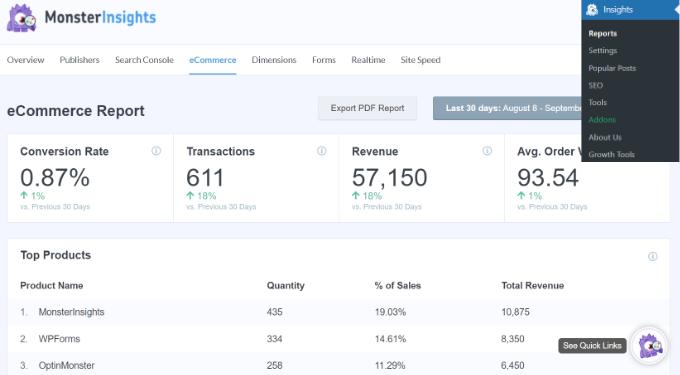
The easiest way to use Google Analytics in WordPress is through MonsterInsights. It is the best Google Analytics plugin for WordPress and makes it super easy to track conversions on your website.
For instance, it has an eCommerce addon, which helps you track your eCommerce performance without leaving the WordPress dashboard. Plus, you can also track form conversions, link clicks, and more with MonsterInsights.
We hope this article helped you learn how to add FOMO to your WordPress website and boost conversions. You may also want to see our list of must-have WordPress plugins for business websites and how to start a WordPress blog.
If you liked this article, then please subscribe to our YouTube Channel for WordPress video tutorials. You can also find us on Twitter and Facebook.
Are you looking for the best WooCommerce theme for your existing Store? If yes, you’ve landed on the right page! Finding an excellent WooCommerce theme is not an easy job. With thousands of WooCommerce theme out there and so many options, it becomes a difficult task to choose the perfect theme. There are so many ... Read more The Best WooCommerce Themes of 2020
The Gutenberg Editor is getting closer to primetime – in WordPress 4.9.5, users will see a dashboard prompt that nudges them to Try the new editing experience. Mark Uraine also has some good thoughts on the Gutenberg interface. And WP Tavern published another good Gutenberg read if you still haven’t had your fill of Gutenberg talk. ... Read moreWeekly WordPress News: Gutenberg Gets More Public In WordPress 4.9.5